

经过这两天学习,终于知道如何在宿主机上执行docker容器命令了。
回顾
之前我在1panel上搭建了一个php项目,由于1panel是使用的php容器,而不是像lnmp集成环境那样在宿主机上有相应的环境。因此,在使用composer初始化项目时遇到了麻烦。
宿主机直接提示没有composer命令。而我又不想在宿主机上再布置一个lnmp集成环境,于是采用偷懒的方式,将本地的vendor目录上传到了服务器,现在麻烦的事来了,我这边项目升级了依赖库,难道我再重新将vendor再上传一次??
所以,我不得不去找度娘,终于皇天不负有心人,找到了答案。
解决
首先我需要知道docker镜像的ID,于是需要输入下面命令获取所有镜像。
#docker ps -a
CONTAINER ID   IMAGE                                 COMMAND                  CREATED             STATUS                 PORTS                                       NAMES
c700b92ea186   1panel-php:8.3.8                      "docker-php-entrypoi…"   About an hour ago   Up About an hour       127.0.0.1:9000->9000/tcp                    1Panel-php7-b0k3
0b0c1474f755   vaultwarden/server:1.32.4-alpine      "/start.sh"              9 days ago          Up 9 days (healthy)    127.0.0.1:40031->80/tcp                     passcontain
c700b92ea186 这个就是php容器的ID,可以接着输入一下命令进入到容器内部。
#docker exec -it c700b92ea186 /bin/sh
/www # _
于是就成功进入到容器内部,接着只需要找到项目路径,就可以执行项目初始化了。
新的问题
一般人走到上面,问题就基本解决了。但我不是一般人,所以遇到了问题。
项目中有几个composer包是自己独立开发的,虽然推送到了packagist.org,但由于使用人数太少,国内镜像基本都拉不到,因此需要自定义composer文件。
#composer.json
{
    "name": "sffi/plugsystem",
    "description": "the new thinkphp framework",
    "type": "project",
    "keywords": [
        "framework",
        "thinkphp",
        "ORM"
    ],
    "homepage": "https://www.thinkphp.cn/",
    "license": "Apache-2.0",
    "require": {
        "php": ">=8.2",
        "topthink/framework": "^8.0.0",
        "topthink/think-orm": "*",
        "topthink/think-filesystem": "*",
        "topthink/think-multi-app": "*",
        "topthink/think-view": "*",
        "sffi/element-plus": "*",
        "sffi/recovery": "*",
        "ext-bcmath": "*"
    },
    "require-dev": {
        "symfony/var-dumper": "^4.2",
        "topthink/think-trace": "^1.0"
    },
    "autoload": {
        "psr-4": {
            "app\\": "app"
        },
        "psr-0": {
            "": "extend/"
        }
    },
    "config": {
        "preferred-install": "dist",
        "allow-plugins": {
            "easywechat-composer/easywechat-composer": true
        }
    },
    "scripts": {
        "post-autoload-dump": [
            "@php think service:discover",
            "@php think vendor:publish"
        ]
    },
    "repositories": {
        "packagist": {
            "type": "composer",
            "url": "https://mirrors.aliyun.com/composer/"
        },
        "***": {
            "type": "git",
            "url": "https://gitee.com/*****.git"
        },
        "*****": {
            "type": "git",
            "url": "https://gitee.com/*****.git"
        }
    }
}
在composer文件中repositories下自定义了几个type为git的路径。
于是就出现了下面的报错:
  In Git.php line 584:

  Failed to clone https://gitee.com/XiaoMingYu/php-to-element.git, git was not found, check that it is installed and in your PATH env.

  sh: exec: line 0: git: not found
大概的意思呢,就是说容器内没有git命令。
那我想宿主机有git命令呀,于是就问度娘,有没有什么办法可以让容器执行宿主机的命令的方式吗?
度娘思索了一会,告诉了我一个答案,将git命令所在的磁盘,映射到容器的执行目录,不就可以执行了吗?
于是就有了一下尝试:
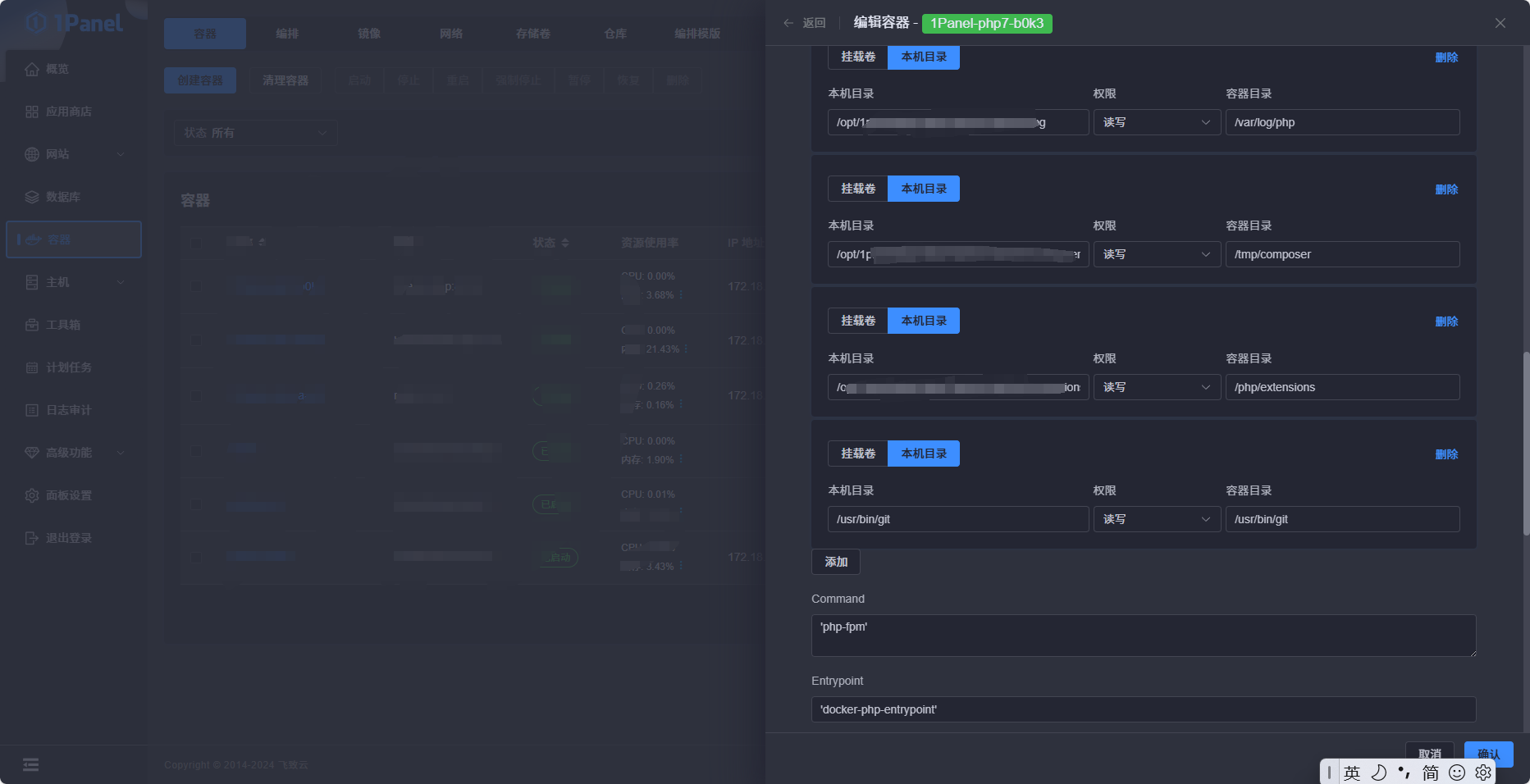
首先必须先将git映射到容器,于是加上了最后一条本地目录/usr/bin/git:/usr/bin/git的磁盘映射。
然后等容器启动,进入容器执行:
# /usr/bin/git -v
bin/sh: /usr/bin/git: not found不是,我明明TAB都能按出来,你告诉我没找到?人都傻了。首先我申明下,不是我不想在容器中安装一个git,而是容器中不识别apt,yum等安装命令。
先到这里。下次再聊。